When coordinators search for the best way to handle digital permission slips, the question of SignPayGo vs Google Forms for permission slips comes up more than almost any other. Most of us have tried building a Google Form thinking it would finally replace the paper permission slip chase, only to realize halfway through setup that there’s no signature field, no way to collect the field trip fee, and zero chance of it automatically nudging the twelve parents who still haven’t responded by Thursday. That’s exactly the gap SignPayGo was built to fill. Here, we’re going to look at what each tool actually does natively, what it realistically costs to run, and which one makes sense for your school or program based on what you actually need from a digital permission slip workflow.
This isn’t a vendor pitch. It’s the kind of honest breakdown one coordinator would give another before they spend an afternoon setting up the wrong tool for an upcoming field trip. By the end, you’ll know exactly what you’re getting into with either choice.
What Google Forms actually handles on its own
The real strengths of Google Forms for basic school data collection
Google Forms genuinely earns its reputation for basic data collection. It’s free, it lives inside Google Workspace that most schools already use, and parents recognize it. You can collect emergency contact info, dietary restrictions, T-shirt sizes, and checkbox acknowledgments without touching a single setting. Responses populate a Google Sheet automatically, which is convenient for organizing class lists or survey results.
For simple informational forms, it works well. A “confirm your child is attending the end-of-year picnic” form? Google Forms handles that fine. The trouble starts when you need a parent’s actual signature, a way to collect the $15 activity fee, and a system that follows up on the families who opened the link and closed it without finishing.
Where Google Forms stops short for real permission slips
Google Forms has no native e-signature field. A checkbox that reads “I agree to the terms above” is not the same as a legally binding electronic signature, and it won’t hold up the same way if a consent dispute arises. There’s also no native payment processing, no automated follow-up reminders for non-respondents, and no audit trail that captures signer identity, timestamp, and the exact consent language shown at signing.
For a basic announcement or preference survey, those gaps don’t matter. For a signed consent form tied to a field trip, a sports camp, or a medical release, they matter a great deal. (See our Basketball Camp Permission Slips & Payments, www.signpaygo.com and Soccer Camp Waivers & Registration, www.signpaygo.com for examples of how a purpose-built flow handles sports registrations.) That’s not a flaw in Google Forms so much as it is a scope mismatch, it was designed for data collection, not for legally compliant electronic consent.
The add-on stack Google Forms needs to become a permission slip tool
Which add-ons can add e-signatures to Google Forms (and what they cost)
Two commonly used options from the Google Workspace Marketplace are Formesign, which starts at $18/month after a 7-day trial, and BoloSign, which offers a free tier capped at 5 form submissions before jumping to $15/month. Both require you to install from the Marketplace, authorize app access to your Google account, and configure each form individually. Setup isn’t impossible, but it isn’t fast. You’re also responsible for vetting whether each add-on meets ESIGN Act standards, the compliance claims vary by vendor, and that research falls entirely on you.
Even with these add-ons installed and fully configured, you still only have signatures. Payments are a completely separate problem that neither add-on solves, meaning you’re looking at a second tool, a second setup, and a second monthly line item before parents have even received anything.
Adding payments: a separate problem entirely
Google Forms has no native payment processing, full stop. To collect a field trip fee or camp registration payment alongside a signed consent form, most administrators end up linking to a separate payment tool or importing the form into a third-party platform that handles both. That creates two separate flows for parents: complete the form here, pay over there. Payment reconciliation then happens manually, cross-referencing a spreadsheet of form responses against a list of payment confirmations from a different platform.
This is where the “free tool” calculus starts to break down. The time cost of that manual reconciliation is real, and so is the confusion it creates for parents who think they’re done after filling out the form.
Reminders and follow-ups: the step most administrators forget to plan for
Native Google Forms sends no automated reminders to parents who haven’t responded. If you want to follow up on the families who haven’t submitted, you’re doing it manually, either by identifying them from a spreadsheet and emailing them individually, or by setting up Google Apps Script automation. Apps Script is powerful, but it’s not something most school coordinators are equipped or have time to configure. This is one of the most overlooked gaps when administrators choose Google Forms for electronic permission slips, and it’s often what sends them looking for alternatives two weeks before a trip.
SignPayGo vs Google Forms: feature comparison for permission slips
E-signatures, payments, and reminders built into one workflow
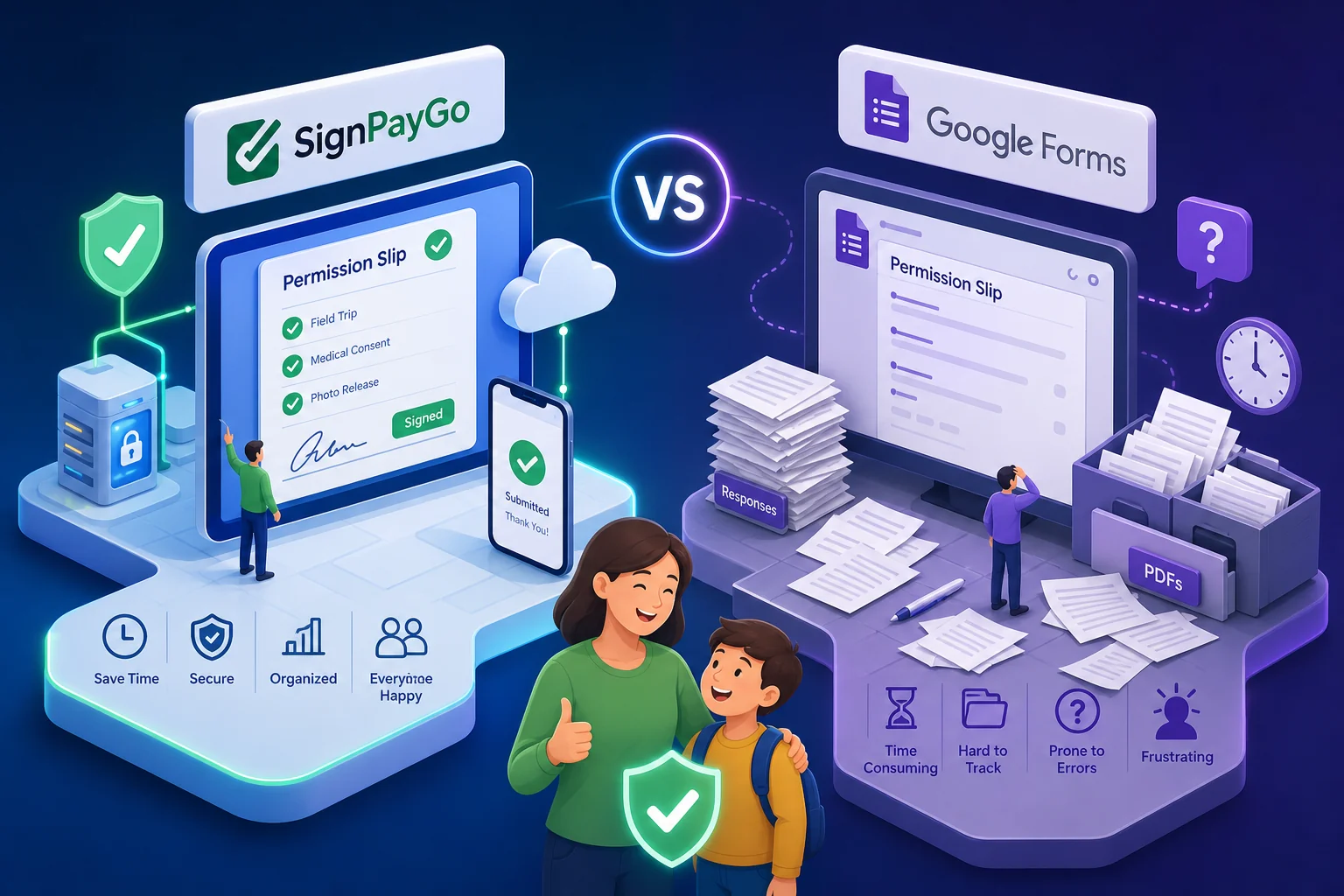
SignPayGo’s permission slip builder includes legal e-signature collection with a full audit trail, timestamp, IP address, device information, and the exact version of the consent language shown at signing. Built-in payment processing supports credit cards, Apple Pay, and Google Pay, with funds deposited the next business day. Automated reminders fire at 1, 3, and 7 days for any parent who hasn’t completed the form, with no Apps Script, no automation setup, and no manual follow-up required from you.
Everything the Google Forms add-on stack attempts to assemble across multiple tools, SignPayGo ships natively through one shareable link. A parent opens it on their phone, reviews the form, signs, pays the fee if there is one, and submits. The whole process typically takes under two minutes on a mobile device.
Bulk sending, real-time tracking, and exportable rosters
Administrators can upload a class list via CSV and send personalized permission slips to every parent in a single action. The real-time dashboard shows who has signed, who has paid, and who still needs follow-up, at a glance, no spreadsheet required. No hunting through email threads to see who responded.
Signed records and payment rosters export in both CSV and PDF formats, which is exactly what you need when you’re checking students onto a bus or handing a roster to a camp counselor on the first day of session. The information is there, organized, and current. For ready-made camp examples and templates, see our Summer Camp Waivers & Registration, www.signpaygo.com.
Compliance and legal record-keeping: which tool actually holds up
What FERPA and the ESIGN Act actually require from a permission slip
FERPA requires that parental consent for disclosing education records include the specific records being disclosed, the purpose, the recipient, and a signature with a date. The ESIGN Act validates electronic signatures when the platform can authenticate the signer and preserve a record of their approval. If a dispute or incident comes up later, schools using a checkbox form will have a hard time proving consent was properly obtained.
Electronic signatures are valid under these frameworks, but only when the platform captures identity, timestamp, and documented consent to the specific language shown, a point summarized in analyses of legal requirements for e-signatures. A checkbox in a Google Form doesn’t reliably establish all of those elements. Schools should verify any vendor’s data processing agreement and authentication methods with district counsel, since FERPA and ESIGN applicability can depend on local policy and district configuration.
SignPayGo’s audit trail vs. Google Forms’ documentation gap
That audit trail, signer identity, timestamp, IP address, device info, and the exact consent language shown at the moment of signing, directly supports what FERPA and the ESIGN Act require. SignPayGo’s documentation captures each of those fields so that if a question ever arises about whether a parent signed a liability waiver before camp, that record is there and complete. Schools should still confirm the vendor’s current DPA and consult district counsel to ensure compliance with their specific requirements.
Google Forms stores checkbox responses in a spreadsheet. There is no signer authentication, no form versioning, and no record confirming what exact language the parent agreed to. For low-stakes data collection, that’s fine. For field trips, medical authorizations, and liability waivers involving minors, that documentation gap is a real risk schools shouldn’t accept when a purpose-built alternative exists.
Cost comparison: SignPayGo vs Google Forms for permission slips
The real monthly cost of a Google Forms permission slip stack
An administrator using Formesign at $18/month or BoloSign at $15/month for signatures, a separate payment tool with its own processing fees, and any reminder automation setup is already spending $15 to $20 or more per month before a single transaction processes. For budget-constrained schools and nonprofits, that recurring cost adds up across a school year, especially when it still requires significant manual coordination for reconciliation and follow-up.
The “Google Forms is free” assumption is accurate for basic forms. For a compliant digital permission slip with signatures, payments, and parent follow-up, it is not a free tool once you’ve added what it actually requires. For background on how online permission slips are being used and why many organizations move away from manual flows, see this overview on online permission slips.
How SignPayGo’s free tier actually works
SignPayGo has no subscription fee, no per-form fee, no per-signature fee, and no per-seat fee. The only cost is a 3.9% + $0.99 payment processing fee on transactions, which administrators can pass to parents at checkout. There are no caps on the number of forms, waivers, or signatures. The first permission slip is free, and so is the hundredth.
For schools or nonprofits that don’t collect payments, the entire platform is genuinely free. That’s a meaningful difference for programs running on tight budgets who need a compliant solution without a monthly line item.
Setting up your first electronic permission slip in under 10 minutes
Step-by-step: from blank screen to sent permission slip
The setup flow in SignPayGo is built so an administrator who has never used the platform can be sending their first slip in under ten minutes. Here’s how it works:
- Create a free SignPayGo account (no credit card required).
- Choose a permission slip or liability waiver template from the library.
- Add custom fields: emergency contacts, medical notes, dietary restrictions, trip fee amount.
- Enable e-signature collection and configure the consent language.
- Turn on payment processing if you’re collecting a fee.
- Set your automated reminder schedule (1, 3, and 7 days for non-respondents).
- Send via a shareable link or upload your class CSV for bulk delivery.
Each step moves quickly. Parents receive a link, open it on their phone, and most complete the form, sign, and pay in about the time it takes to read a text thread. No app download, no account creation, no friction, parents are taken through a hosted checkout for any payment, so there’s nothing extra to install or log in to on their end.
Try SignPayGo’s free tier before your next trip or session
If you have a field trip coming up, a Summer Camp Waivers & Registration, www.signpaygo.com session opening soon, or a new program cohort that needs signed agreements and collected fees, the free tier is the no-risk place to start. You get the full permission slip builder, legally compliant e-signature collection, automated reminders, and real-time tracking without any upfront cost. Payment processing fees only apply when money actually changes hands, and you can pass those fees to parents.
New accounts get a free onboarding call, by the end of it, your first slip is usually already live and sent. There’s no technical setup, no developer needed, and no stack of add-ons to configure.
The bottom line on permission slip software
Google Forms is a solid tool for what it was designed to do: basic data collection. It is not designed for legally compliant digital permission slips with e-signatures, payment collection, and automated parent follow-up. Building that workflow in Google Forms means assembling a stack of add-ons that costs money, takes time to configure, and still leaves compliance gaps in your audit trail and record-keeping.
SignPayGo is built specifically for this problem. It handles every part of the electronic permission slip workflow natively, from the first send to the exported roster on trip day, without a subscription fee and without requiring you to stitch together a stack of add-ons just to replace a paper form. When choosing between SignPayGo vs Google Forms for permission slips, the deciding factor is straightforward: if you need legally supported e-signatures, built-in payment collection, and automated follow-up in one place, SignPayGo is the purpose-built fit.
You don’t have to chase paper anymore. And you don’t have to build a complicated workaround just to get a parent’s signature on a consent form. Start with the free tier, build your first slip in under ten minutes, and see what it feels like when the tool actually matches the job.