Picture this: it’s 7:45 a.m. on the morning of the fall museum trip. Your bus leaves at 8:30. A coordinator is on her knees in front of a filing cabinet, flipping through folders, looking for a liability release that a parent swears she sent back two weeks ago. It’s not there. It never made it out of a backpack. If that scene feels familiar, you’re not alone, it’s one of the most common frustrations coordinators describe, and it’s entirely preventable with the right digital waiver program for independent schools.
Paper-based waivers create compounding problems: legal exposure when records can’t be produced, retrieval nightmares when something goes wrong on a trip, and frustrated parents who genuinely tried to comply but lost the form somewhere between school pickup and dinner. None of these problems reflect poorly on the parent or the coordinator. They reflect poorly on the system. A well-implemented digital waiver at your independent school eliminates all three, and purpose-built platforms have made the switch more straightforward than most coordinators expect. Read on for everything you need to do it correctly, from the legal framework through to the parent experience.
What makes a digital waiver legally valid for your independent school
The federal law behind electronic signatures
The ESIGN Act (2000) and the Uniform Electronic Transactions Act, adopted by 49 states plus D.C., establish that electronic signatures carry the same legal weight as handwritten ones. Four conditions must be met: the signer demonstrated intent to sign, they consented to transact electronically, the signature is logically associated with the specific document, and a retainable copy of the signed record exists. Meeting all four is straightforward when your collection tool handles them by design, with specific features like consent capture, document association, and automatic copy generation built in, rather than leaving you to piece together a compliant workflow manually. For a practical walkthrough of how to structure a legally enforceable digital waiver, see this guide to legally enforceable digital waivers.
FERPA adds an important overlay. Signed waivers containing student data, including medical notes and emergency contacts, are protected education records. This means how you store those records and who can access them matters just as much as how you collected the signature in the first place. A platform that collects signatures but stores them insecurely creates a compliance problem even if the signature itself is valid; be sure to confirm a vendor’s FERPA compliance and storage practices before you roll it out school-wide.
Must-have elements for enforceability
The waiver must describe the specific activity and its inherent risks in plain, direct language. Vague language weakens enforceability; courts look for specificity. Courts also look for a bold, prominent heading that clearly identifies the document as a liability release, not buried fine print.
Every digital waiver independent school administrators deploy should capture the student’s name and date of birth, guardian name and relationship to the student, a clear description of the activity, and an explicit acknowledgment checkbox confirming the signer has read and understood the risks. Date of signing rounds out the required fields. Beyond those basics, many generic form builders overlook timestamp and IP address capture at the moment of signing, features worth verifying in any vendor’s documentation before you commit. This attribution record is what proves who signed, when, and from where, and it’s the foundation of your defense in any dispute.
Security and audit trail requirements that most schools underestimate
Storing signed waivers the right way
Signed waiver data must be encrypted both at rest and in transit, this protects student records under FERPA and limits your school’s liability in the event of a breach. Access controls matter just as much: only staff with a direct, legitimate need should be able to view or download signed waivers, with role-based permissions and multi-factor authentication as the practical standard.
For data retention, follow the 3-2-1 backup rule: three copies of your data, stored on two different media types, with one copy held off-site. This ensures signed records can be restored quickly after any incident, whether a server failure or a cyberattack. Schools that rely on a single cloud folder without tested recovery procedures are one incident away from losing documentation they may urgently need.
What a proper audit trail looks like
A compliant audit trail logs the signer’s identity, timestamp, IP address, and the exact version of the document that was signed. Once submitted, that record is frozen and unalterable. This is what makes a digital waiver independent school administrators can rely on genuinely stronger than paper in a legal dispute: you pull up the exact signed document in seconds, with proof of who signed it and when, rather than searching a filing cabinet that may come up empty.
Verify that your chosen platform stores audit logs separately from the document itself, and confirm how long they’re retained. Your state’s statute of limitations for personal injury claims determines the minimum retention period you should build your policy around.
A practical implementation checklist for school coordinators
Before you send your first waiver
Start with a template reviewed by your school’s legal counsel or insurer. Liability release language must match your specific activity types and your state’s law; a generic template pulled from a website may not hold up. Identify the required fields for each form type, liability release, parental consent, photo and media release, and any enrollment waiver online or fee authorization. Keep each form focused on its specific purpose rather than bundling everything into one long document that overwhelms parents and dilutes legal clarity. If you need a starting point for permissions and field-trip language, a permission slip template can help you structure the core elements before legal review.
For distribution, a single shareable link sent via email works well for most scenarios. Include a brief confirmation message so parents know their submission went through, this small detail reduces follow-up questions significantly. QR codes are an effective option for in-person events or tablet-based check-in at the door. Both approaches meet parents where they already are, without requiring an app download.
Making the parent experience work on mobile
The majority of parents will open your waiver link on a smartphone. If the form isn’t designed for mobile completion, your submission rate will suffer regardless of how well the waiver is drafted. Fields should be thumb-friendly, signature pads should scale to screen size, and where a school fee waiver form or activity fee is involved, payment collection should support Apple Pay and Google Pay so parents aren’t hunting for a card while standing in a carpool line.
Automated follow-up reminders to parents who haven’t signed are one of the highest-leverage features you can enable. Setting reminders to trigger around 48 hours before your deadline, as an example starting point, can significantly cut down the manual chasing that consumes coordinator time before every trip or activity. Adjust the timing based on your community’s response patterns. For ideas on digitizing permission workflows and improving signature rates, see resources on online permission slips.
Choosing the right digital waiver solution for independent schools
Why generic tools create more work than they solve
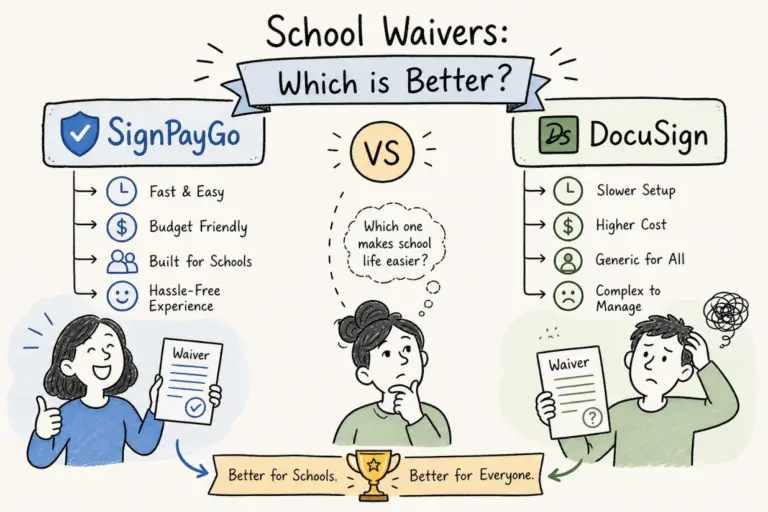
Many general-purpose form builders can collect a signature, but they often lack compliant audit trails, integrated payment collection, or a connection to your student information system. That means you end up managing several separate tools and reconciling data manually after every event. For a coordinator running multiple activities across a semester, that overhead compounds quickly. If you’re evaluating options, compare purpose-built platforms directly, for example, read the comparison of SignPayGo vs DocuSign: Which wins for school waivers? to understand the operational differences relevant to schools.
For independent schools, the integration question is especially important. If your SIS is Veracross, a tool that pulls student and family data directly from your existing records eliminates duplicate entry and keeps rosters automatically in sync. Veracross doesn’t offer native e-signature workflows, which means schools running on it need a purpose-built solution that bridges that gap cleanly.
What SignPayGo was built to do
SignPayGo combines digital waiver collection, legally compliant e-signatures, and payment processing into a single shareable link. No app download is required for parents, and no technical setup is required for administrators. The platform captures timestamps, IP addresses, and audit logs by design, so the compliance requirements described above are handled automatically rather than left to you to configure. Learn more about the platform’s waiver capabilities on the dedicated SignPayGo waivers page.
The native Veracross integration is the feature that makes the biggest operational difference for independent schools already on that SIS. Student and family data flows directly from your existing records into each waiver form, no manual entry or post-collection reconciliation, and no data mismatch on the morning of a trip. Real-time dashboards show exactly who has signed and who hasn’t, exportable rosters in CSV and PDF formats are ready for day-of logistics, and automated reminders handle the follow-up so your coordinators can focus on the program itself.
The bottom line for independent school administrators
A digital waiver independent school program is more legally defensible than paper when it’s built correctly, stored securely, and collected through a purpose-built tool. The legal framework is clear, the required fields are definable, and the right software handles the compliance heavy lifting so your team doesn’t have to become experts in ESIGN or FERPA to operate confidently.
The implementation is manageable. Start with legally reviewed templates, configure your required fields, set up automated reminders, and verify that your platform captures proper audit trails and encrypts records at rest. That checklist covers the essentials, and a well-designed tool walks you through each step.
If your school runs on Veracross, or you’re simply tired of chasing paper forms through backpacks and filing cabinets, SignPayGo was designed specifically for this workflow and is built for fast deployment. Your next field trip doesn’t need a coordinator on her knees in front of a filing cabinet at 7:45 a.m. Request a demo of SignPayGo and see how quickly your digital waiver independent school setup can be up and running.