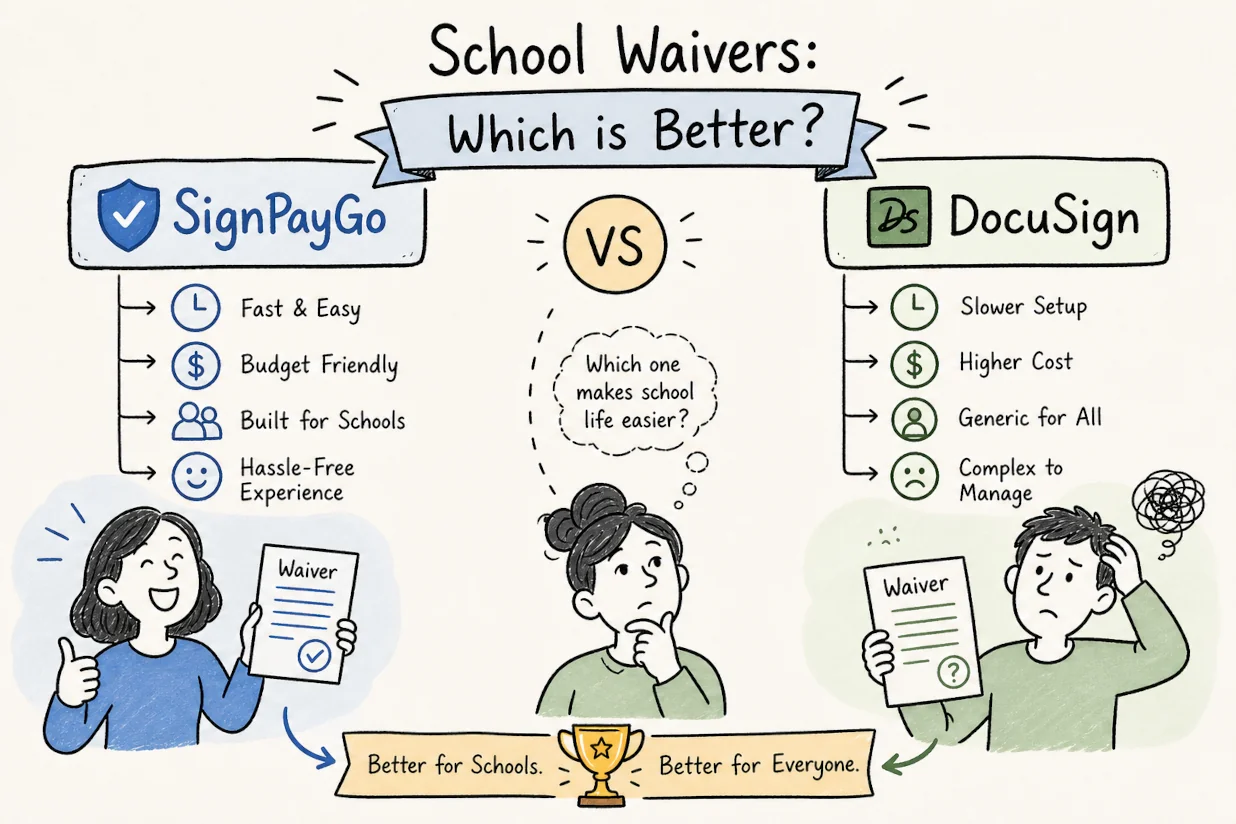
A school coordinator shouldn’t need an IT department and three separate tools to collect a signed field trip form and a $12 payment. Yet that’s exactly the situation when you try to adapt an enterprise e-signature platform to a job it was never designed for. The SignPayGo vs DocuSign comparison for school waivers comes down to a simple question: do you want a tool built for corporate legal teams, or one built for the actual workflow of a field trip coordinator on a Tuesday morning?
DocuSign is a powerful platform. Nobody is disputing that. But “powerful” doesn’t mean “right for your needs,” and for schools, camps, and youth program coordinators, the mismatch between what DocuSign offers and what a permission slip workflow actually requires is where the frustration lives. This article walks through the five criteria school admins care most about: cost, parent experience, built-in payment collection, workflow features, and compliance. By the end, you’ll know exactly which tool fits your situation, and why choosing between SignPayGo and DocuSign for school waivers is, in most cases, not a close call.
What each tool is actually built for
DocuSign’s design: enterprise contracts, not school forms
DocuSign is one of the most widely recognized e-signature platforms in the world, and it earns that reputation in the contexts where it was designed to operate: corporate contracts, real estate closings, HR agreements, and procurement documents. Its workflow is document-centric. You upload a file, assign signers, send, and collect signatures. That process works beautifully for a commercial lease or an employment contract.
What DocuSign does not include natively is a purpose-built permission slip form builder with fields for emergency contacts and dietary restrictions. It does offer payment collection via DocuSign Payments, which connects to gateways like Stripe to support credit cards, ACH, Apple Pay, and Google Pay, but this requires gateway configuration, a higher-tier plan, and technical setup time that assumes a capable admin on staff. Automated roster-aware reminders to parents who haven’t responded and a day-of roster export for the bus driver are also absent from DocuSign’s native feature set. Those aren’t oversights; they’re simply outside the scope of what DocuSign was ever designed to do.
SignPayGo’s design: the full school workflow in one link
According to SignPayGo’s product documentation, the platform was built specifically for camp directors, school coordinators, and coaches who need one shareable link to handle everything. Parents tap the link on their phone and work through emergency contacts, medical notes, the liability waiver, and the trip payment in a single linear flow (for a real-world example, see a typical soccer camp waivers & registration flow). Everything happens in that flow, no app download, no account creation, and no coordinator stitching together a form builder, a signature tool, and a separate payment processor.
The distinction matters because it changes the entire experience on both sides. The coordinator sets up once and gets responses. The parent completes everything in a single session on their phone. That’s not a feature list; it’s a fundamentally different product philosophy.
Cost: SignPayGo vs DocuSign for School Waivers
What DocuSign costs at school-team volume
DocuSign’s 2026 pricing tiers for small teams start at $15/month for a Personal plan (billed monthly, per DocuSign’s published pricing page) with a cap of five envelopes per month. A single field trip coordinator managing multiple classes, say, three forms per trip across two trips in a week, would exhaust that monthly envelope cap in a single day. The Standard plan runs $45/user/month billed monthly, or $25/user/month on an annual commitment, with up to 100 envelopes per user per year. Business Pro, which includes the payment collection add-on and bulk send, runs $65/user/month billed monthly.
For a ten-person school admin team using Standard or Business Pro, the monthly subscription cost reaches $400 to $600 before any overage fees. K-12 education pricing exists, but it’s generally available only through enterprise sales conversations, not self-serve signup. For a small school or a summer camp running on a tight budget, that cost structure alone ends the conversation.
SignPayGo’s free tier and transparent fee structure
SignPayGo’s published pricing shows no monthly subscription and no per-signature charges. The only fee is a 3.9% + $0.99 payment processing charge, which applies only when a parent makes a payment through the platform. If you’re collecting signed permission slips and liability waivers with no payment component, the cost is zero.
For most K-12 schools and small camps operating on restricted budgets, that gap is decisive. Consider a coordinator sending 500 permission slips in a semester: at SignPayGo, that costs nothing in subscription fees (compare that reality with the hidden cost of paper permission slips). At a comparable DocuSign tier, you’re looking at $400 or more per month before overages, and that assumes your envelope allocation even covers the volume. SignPayGo’s model was designed for how schools actually fund operations: carefully, with every line item justified.
Permission Slips, Waivers, and Payment Collection: SignPayGo vs DocuSign for School Waivers
What DocuSign does not natively offer for school workflows
Beyond payment configuration complexity, DocuSign’s workflow gaps for school use are significant. There is no school-specific permission slip template with fields for emergency contacts, photo consent, and dietary restrictions, templates exist (see examples of online waiver forms), but building a school-ready form requires manual customization. There is no real-time dashboard showing which families have signed and paid versus which still need follow-up. And there is no roster export in CSV or PDF format for day-of logistics. DocuSign can collect a signature. Everything else in a coordinator’s workflow has to happen somewhere else.
DocuSign does support reminders, which can be configured within envelope settings. But those reminders are not roster-aware, they’re tied to individual envelopes rather than a class list, and they require manual setup for each sending, which is a meaningful friction point when you’re managing 30 families on a deadline.
How SignPayGo handles the complete workflow in one place
According to SignPayGo’s product documentation, the platform’s custom form builder includes the fields a coordinator typically needs before a field trip or camp session: emergency contacts, medical information, photo consent, dietary restrictions, and the liability waiver e-signature, all in one form. Built-in payment processing is integrated into the same parent-facing flow immediately after signing, with no separate gateway configuration required on the coordinator’s end.
The platform also offers bulk sending via CSV roster upload, automated follow-up reminders to non-responders, and a real-time dashboard showing signature status, payment status, and total collected, all included at no extra cost, per SignPayGo’s published feature set. An exportable roster in CSV and PDF formats is available for day-of logistics. This is the core differentiator in the SignPayGo vs DocuSign comparison for school waivers: one link handles everything, and the coordinator can see exactly where things stand at any point before the deadline.
Parent UX: SignPayGo vs DocuSign for School Waivers
What parents actually experience with each platform
DocuSign’s parent-facing experience requires opening an email, navigating the DocuSign interface, and working through a signing workflow designed for contract signers. It functions correctly, but it is not optimized for a parent who has three minutes between school pickup and soccer practice and just needs to sign the permission slip. The friction is real, and friction means forms that come back late or not at all.
SignPayGo’s parent link is designed to open directly in any mobile browser without an account, login, or app download, a workflow approach common to purpose-built consent platforms. The parent works through the form, signature, and payment in a single mobile-first flow. In most cases, a first-time parent can complete the process in under two minutes. For coordinators who have spent years chasing down the last five families who “didn’t get the form,” that difference in completion rate is the whole point.
Automated reminders and bulk sending at scale
DocuSign supports reminders, but they require manual configuration per envelope and are not designed around a class roster. There is no purpose-built follow-up sequence that tracks which parents on your uploaded list haven’t responded and pings them automatically. SignPayGo, according to vendor documentation, includes automated follow-up reminders to parents who haven’t completed the form, removing the coordinator’s need to track responses manually and re-contact families individually.
Bulk sending via CSV roster upload handles both a 20-student classroom and a 300-camper summer session. The coordinator uploads the roster once, sends the link in bulk, and monitors responses from a single dashboard. That workflow, automated, roster-aware, and consolidated, is the kind of waiver management software purpose-built platforms offer that a general-purpose e-signature tool simply doesn’t replicate out of the box.
Legal compliance, audit trails, and data privacy
ESIGN Act compliance and what it means for school forms
DocuSign’s compliance with the U.S. ESIGN Act and UETA is well-documented, making its electronic signatures legally binding for parental consent forms, liability waivers, and field trip permission slips. Schools evaluating any digital signature platform for school waivers should verify the same compliance posture with their vendor before deploying, including how the platform captures and stores evidence of signer intent, identity, and document integrity.
That evidence layer matters. A timestamped completion record tied to a parent’s verified email address, showing when the form was opened, when it was signed, and what version of the document was in place at signing, is the standard of documentation schools need for parental consent workflows if a dispute arises later.
Audit trails, completion certificates, and record retention
DocuSign generates detailed completion certificates, tamper-evident audit logs, and IP and timestamp metadata for every signing event. For formal disputes involving enterprise contracts or employment agreements, that level of documentation is genuinely useful. Schools evaluating SignPayGo should verify directly with the vendor that it provides exportable completion records, signer timestamps, and audit logs sufficient for a parent consent dispute or records request, that’s the baseline any compliant permission slip platform should meet before you commit to it.
FERPA, COPPA, and data privacy considerations
Any platform handling student or parent data should be evaluated against FERPA access controls, data-use limitations, and the requirement for a vendor data-processing agreement. The questions are the same regardless of vendor: Is student data used for advertising? How long are records retained? Does the contract include FERPA-aligned privacy terms? Can records be exported and deleted on the school’s schedule? For an overview of FERPA considerations specific to e-signatures, vendors and schools often consult resources like FERPA and e-signatures guides.
For camps collecting parent contact information and payment data rather than academic records, the FERPA risk profile is lower, but COPPA considerations around children under 13 still apply. Both platforms should be able to provide a vendor data-processing agreement and clear answers on data retention and secondary use before a school commits to either one.
Which platform fits your school’s workflow?
When DocuSign is the right call
DocuSign is the stronger choice for school districts processing formal employment contracts, procurement agreements, board-level documents, or other high-stakes legal paperwork where maximum audit trail depth and enterprise-grade defensibility matter. If your IT team can manage the configuration, the district has the budget for per-user subscriptions, and the use case is formal legal documentation rather than parent consent workflows, DocuSign handles that job well.
But for the daily work of a field trip coordinator or camp director, DocuSign is overbuilt in some areas and missing the workflow pieces that matter most. You pay for features you don’t need and build workarounds for the ones you do, specifically, the roster-aware reminders, the integrated payment flow, and the day-of roster export that coordinators actually depend on.
When SignPayGo is the right fit for schools and camps
If the job is collecting signed permission slips, liability waivers, emergency contact forms, and trip payments from parents, SignPayGo was built for exactly that workflow. It costs less at operational volume, is designed to require no technical setup, and gets parents through the form in a single mobile session. Coordinators go from creating a form to sending a link in minutes rather than days, the kind of fast turnaround that purpose-built waiver management software makes possible.
For any school coordinator managing field trips, camp registrations, after-school program enrollment, or youth sports waivers, SignPayGo is the purpose-built tool for this work (see related football camp permission slips & waivers & payments example). The free tier means there’s no cost barrier to testing whether it fits your workflow. Set it up, send your first form, and compare the response rate to whatever you’re using now.
The bottom line: SignPayGo vs DocuSign for school waivers
DocuSign is a genuinely solid product for the workflows it was designed to serve. School permission slips and field trip payment collection are not those workflows. The cost structure, the missing school-specific form builder, the manual reminder setup, and the parent experience optimized for contract signers rather than busy families all point toward the same conclusion: DocuSign is the wrong tool for this particular job.
SignPayGo is designed to handle the full coordinator workflow: build the form, collect the liability waiver signature, process the payment, send automatic reminders to non-responders, and export the roster before the bus leaves. That’s the job. One tool, one link, zero paper. When weighing alternatives to DocuSign for waivers, that combination of purpose-built SignPayGo features, especially at zero monthly cost, is hard to argue against for schools and camps.
The next step is straightforward: sign up for SignPayGo’s free tier, build your first permission slip form, and send it to a test roster. You’ll be operational before the end of the day, and you’ll spend exactly $0 to find out whether it’s the right fit for your school.